Scaling RPC / Gateway Services
Tags: “Pro version of blockchain network” “Scaling RPC service”
If the RPC / Gateway service cannot support business traffic, you need to scale out the RPC / Gateway service. BcosBuilder provides the function of scaling out the RPC / Gateway service. This chapter uses a stand-alone scaling out of the RPC / Gateway service of the Pro version FISCO BCOS alliance chain as an example to help users master the service scaling steps of the Pro version FISCO BCOS blockchain。
Note
Before scaling out RPC, refer to Building a Pro Blockchain Network<./installation.html>’_ Deploy Pro version blockchain。
1. Deploy tarsnode
Before scaling the RPC / Gateway service, you must first install the tarsnode on the machine where the scaled-out RPC / Gateway service node is deployed. To help users quickly experience the service scaling process on a single machine, this chapter directly virtualizes the container with IP address’ 172.25.0.5 ‘through the bridge network as the physical machine on which the scaled-out RPC / Gateway service node is installed。
Note
for the installation of tarsnode in the actual production environment, see ‘tars installation and deployment’<https://doc.tarsyun.com/#/markdown/ TarsCloud/TarsDocs/installation/README.md>`_
# Enter the operation directory
cd ~/fisco/BcosBuilder

# Linux system: Go to the directory where tarsnode docker-compose is located(macos system can be skipped)
cd docker/bridge/linux/node

# macos system: Go to the directory where tarsnode docker-compose is located(Linux system can be skipped)
cd docker/bridge/mac/node

# Install and start tarsnode
docker-compose up -d
After the tarsnode is successfully installed, you can use the [Operation and Maintenance Management] ->The newly installed tarsnode with IP address’ 172.25.0.5 ‘is displayed in [Node Management]:
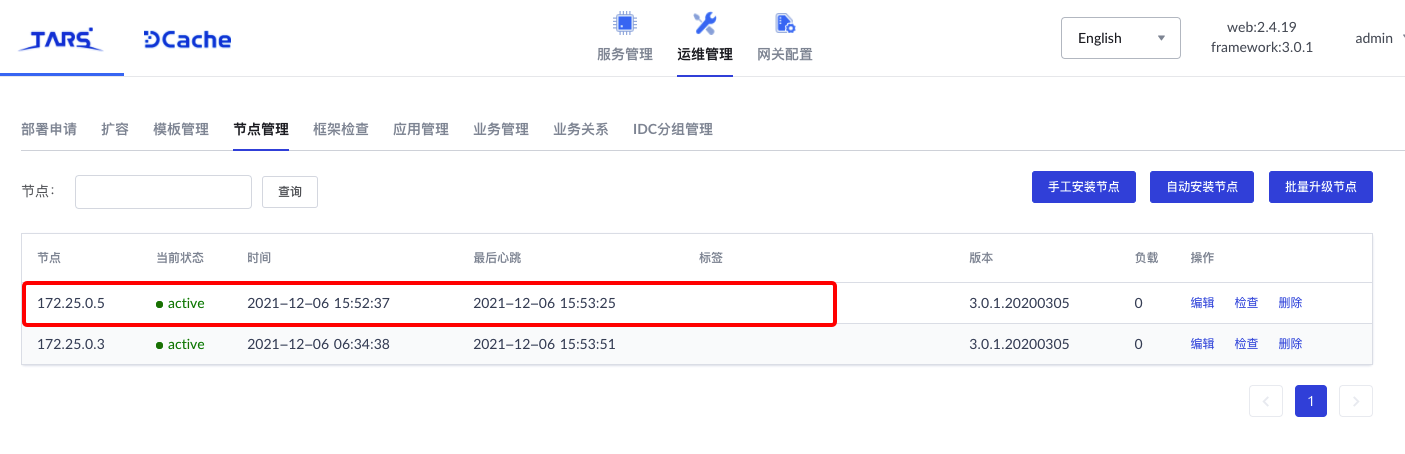
2. Set the RPC / Gateway service expansion configuration
Note
In the actual operation, the tars token must be replaced with the tars web management platform [admin] ->User Center ->[token management] obtaining available tokens。
For more information about how to configure RPC / Gateway service expansion, see the expansion template ‘conf / config-service-expand-example.toml’ of ‘BcosBuilder’. The specific configuration steps are as follows:
# Enter the operation directory
cd ~/fisco/BcosBuilder/pro

# Copy Template Configuration
cp conf/config-service-expand-example.toml config.toml

# Configure tars token: Through the tars web management platform [admin] ->User Center ->[token management] obtaining available tokens
# The token here is: eyJhbGciOiJIUzI1NiIsInR5cCI6IkpXVCJ9.eyJ1aWQiOiJhZG1pbiIsImlhdCI6MTYzODQzMTY1NSwiZXhwIjoxNjY3MjAyODU1fQ.430Gi
# Linux system(macOS system Skip this step):
sed -i 's/tars_token = ""/tars_token = "eyJhbGciOiJIUzI1NiIsInR5cCI6IkpXVCJ9.eyJ1aWQiOiJhZG1pbiIsImlhdCI6MTYzODQzMTY1NSwiZXhwIjoxNjY3MjAyODU1fQ.430ni50xWPJXgJdckpOTktJB3kAMNwFdl8w_GIP_3Ls"/g' config.toml
# macos system(Linux system skips this step):
sed -i .bkp 's/tars_token = ""/tars_token = "eyJhbGciOiJIUzI1NiIsInR5cCI6IkpXVCJ9.eyJ1aWQiOiJhZG1pbiIsImlhdCI6MTYzODQzMTY1NSwiZXhwIjoxNjY3MjAyODU1fQ.430ni50xWPJXgJdckpOTktJB3kAMNwFdl8w_GIP_3Ls"/g' config.toml
Configure ‘config.toml’ for scaling as follows:
[tars]
tars_url = "http://127.0.0.1:3000"
tars_token = "eyJhbGciOiJIUzI1NiIsInR5cCI6IkpXVCJ9.eyJ1aWQiOiJhZG1pbiIsImlhdCI6MTYzODQzMTY1NSwiZXhwIjoxNjY3MjAyODU1fQ.430ni50xWPJXgJdckpOTktJB3kAMNwFdl8w_GIP_3Ls"
tars_pkg_dir = "binary/"

[chain]
chain_id="chain0"
rpc_sm_ssl=false
gateway_sm_ssl=false
# the ca path of the expanded rpc service
# must ensure that the path configuration is correct, otherwise the ssl verification will fail
rpc_ca_cert_path="generated/rpc/chain0/ca"
# the ca path of the expanded gateway service
# must ensure that the path configuration is correct, otherwise the ssl verification will fail
gateway_ca_cert_path="generated/gateway/chain0/ca"

[[agency]]
name = "agencyA"
# enable data disk encryption for rpc/gateway or not, default is false
enable_storage_security = false
# url of the key center, in format of ip:port, please refer to https://github.com/FISCO-BCOS/key-manager for details
# key_center_url =
# cipher_data_key =

    [agency.rpc]
    deploy_ip=["172.25.0.5"]
    listen_ip="0.0.0.0"
    listen_port=10200
    thread_count=4

    [agency.gateway]
    deploy_ip=["172.25.0.5"]
    listen_ip="0.0.0.0"
    listen_port=40300
    peers=["172.25.0.3:30300", "172.25.0.3:30301", "172.25.0.5:40300"]
3. Expand RPC service
# Enter the operation directory
cd ~/fisco/BcosBuilder/pro

# Scale out and deploy RPC services
python3 build_chain.py chain -o expand -t rpc

# Use telnet to detect whether the RPC service is successfully expanded
telnet 127.0.0.1 10200
After executing the above command, when the script outputs’ expand service success, type: rpc ‘indicates that the RPC service has been successfully expanded. The detailed log output is as follows:
=========================================================
----------- expand service, type: rpc -----------
=========================================================
----------- generate service config -----------
* generate service config for 172.25.0.5 : agencyABcosRpcService
* generate config for the rpc service
* generate generated/rpc/chain0/172.25.0.5/agencyABcosRpcService/config.ini.tmp
* generate cert, output path: generated/rpc/chain0/172.25.0.5/agencyABcosRpcService
* generate sdk cert, output path: generated/rpc/chain0/172.25.0.5/agencyABcosRpcService
* generate config for the rpc service success
gen configuration for service agencyABcosRpcService success
----------- generate service config success -----------
=========================================================
----------- begin expand service -----------
expand to 172.25.0.5, app: chain0, name: agencyABcosRpcService
expand_server_preview, app: chain0, server_name: agencyABcosRpcService, expanded_node_list: 172.25.0.5
expand server preview response b'{"data":[{"application":"chain0","server_name":"agencyABcosRpcService","set":"..","obj_name":"RpcServiceObj","node_name":"172.25.0.5","bind_ip":"172.25.0.5","port":0,"template_name":"tars.cpp.default","status":"\xe6\x9c\xaa\xe6\x89\xa9\xe5\xae\xb9","auth":0}],"ret_code":200,"err_msg":""}'
expand_server, app: chain0, server_name: agencyABcosRpcService
expand server response b'{"data":{"tars_node_rst":[]},"ret_code":200,"err_msg":""}'
* add config for service agencyABcosRpcService, node: 172.25.0.5, config: ca.crt
* add config for service agencyABcosRpcService, node: 172.25.0.5, config: ssl.key
* add config for service agencyABcosRpcService, node: 172.25.0.5, config: ssl.crt
* add config for service agencyABcosRpcService, node: 172.25.0.5, config: config.ini
upload tar package generated/./agencyABcosRpcService.tgz success, config id: 19
----------- expand service success, type: rpc -----------
=========================================================
The RPC service-related configuration generated during the scaling process is located at ‘generated / rpc / \({chainID}/\){deploy_ip}’Directory, as follows:
$ tree generated/rpc/chain0/172.25.0.5
generated/rpc/chain0/172.25.0.5
└── agencyABcosRpcService
    ├── config.ini.tmp
    ├── sdk
    │   ├── ca.crt
    │   ├── cert.cnf
    │   ├── sdk.crt
    │   └── sdk.key
    └── ssl
        ├── ca.crt
        ├── cert.cnf
        ├── ssl.crt
        └── ssl.key
After the RPC service is successfully expanded, you can see the [service list] of the service ‘agencyABcosRpcService’ on the tars web management platform, and there is an additional RPC service on the ‘172.25.0.5’ IP:
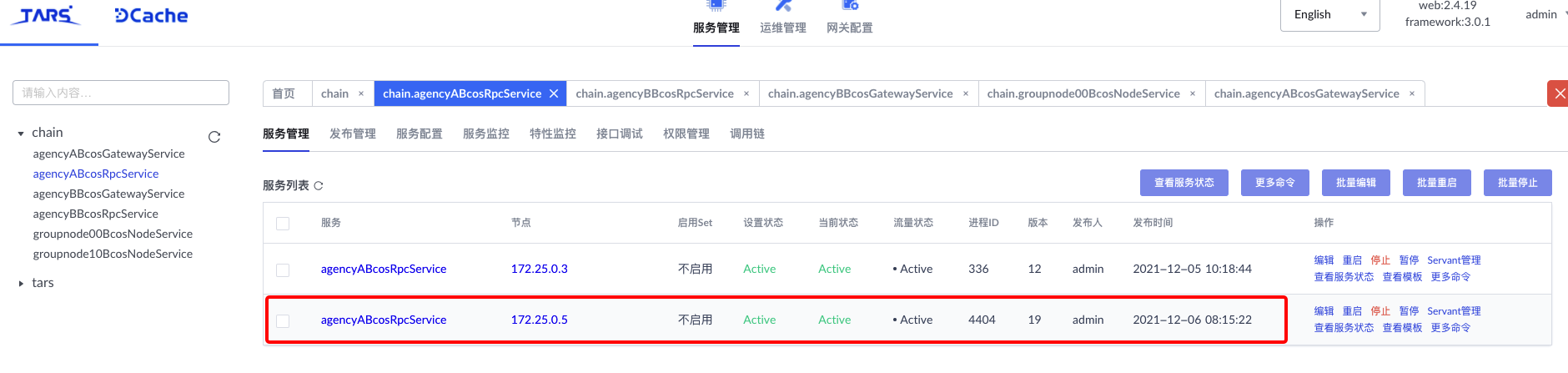
4. Expand Gateway service
# Enter the operation directory
cd ~/fisco/BcosBuilder/pro

# Scale out and deploy RPC services
python3 build_chain.py chain -o expand -t gateway

# Use telnet to detect whether the RPC service is successfully expanded
telnet 127.0.0.1 40300
After executing the above command, when the script outputs’ expand service success, type: gateway ‘indicates that the gateway service has been successfully expanded. The detailed log output is as follows:
=========================================================
----------- expand service, type: gateway -----------
=========================================================
----------- generate service config -----------
* generate service config for 172.25.0.5 : agencyABcosGatewayService
* generate config for the gateway service
* generate generated/gateway/chain0/172.25.0.5/agencyABcosGatewayService/config.ini.tmp
* generate cert, output path: generated/gateway/chain0/172.25.0.5/agencyABcosGatewayService
* generate gateway connection file: generated/gateway/chain0/172.25.0.5/agencyABcosGatewayService/nodes.json.tmp
* generate config for the gateway service success
gen configuration for service agencyABcosGatewayService success
----------- generate service config success -----------
=========================================================
----------- begin expand service -----------
expand to 172.25.0.5, app: chain0, name: agencyABcosGatewayService
expand_server_preview, app: chain0, server_name: agencyABcosGatewayService, expanded_node_list: 172.25.0.5
expand server preview response b'{"data":[{"application":"chain0","server_name":"agencyABcosGatewayService","set":"..","obj_name":"GatewayServiceObj","node_name":"172.25.0.5","bind_ip":"172.25.0.5","port":0,"template_name":"tars.cpp.default","status":"\xe6\x9c\xaa\xe6\x89\xa9\xe5\xae\xb9","auth":0}],"ret_code":200,"err_msg":""}'
expand_server, app: chain0, server_name: agencyABcosGatewayService
expand server response b'{"data":{"tars_node_rst":[]},"ret_code":200,"err_msg":""}'
* add config for service agencyABcosGatewayService, node: 172.25.0.5, config: nodes.json
* add config for service agencyABcosGatewayService, node: 172.25.0.5, config: ca.crt
* add config for service agencyABcosGatewayService, node: 172.25.0.5, config: ssl.key
* add config for service agencyABcosGatewayService, node: 172.25.0.5, config: ssl.crt
* add config for service agencyABcosGatewayService, node: 172.25.0.5, config: config.ini
upload tar package generated/./agencyABcosGatewayService.tgz success, config id: 21
----------- expand service success, type: gateway -----------
=========================================================
The Gateway service-related configuration generated during the scaling process is located in ‘generated / gateway / \({chainID}/\){deploy_ip}’Directory, as follows:
$ tree generated/gateway/chain0/172.25.0.5
generated/gateway/chain0/172.25.0.5
└── agencyABcosGatewayService
    ├── config.ini.tmp
    ├── nodes.json.tmp
    └── ssl
        ├── ca.crt
        ├── cert.cnf
        ├── ssl.crt
        └── ssl.key
After the Gateway service is successfully expanded, you can see [in the service list] of the service ‘agencyABcosGatewayService’ on the tars web management platform, and there is an additional Gateway service on the ‘172.25.0.5’ IP address:
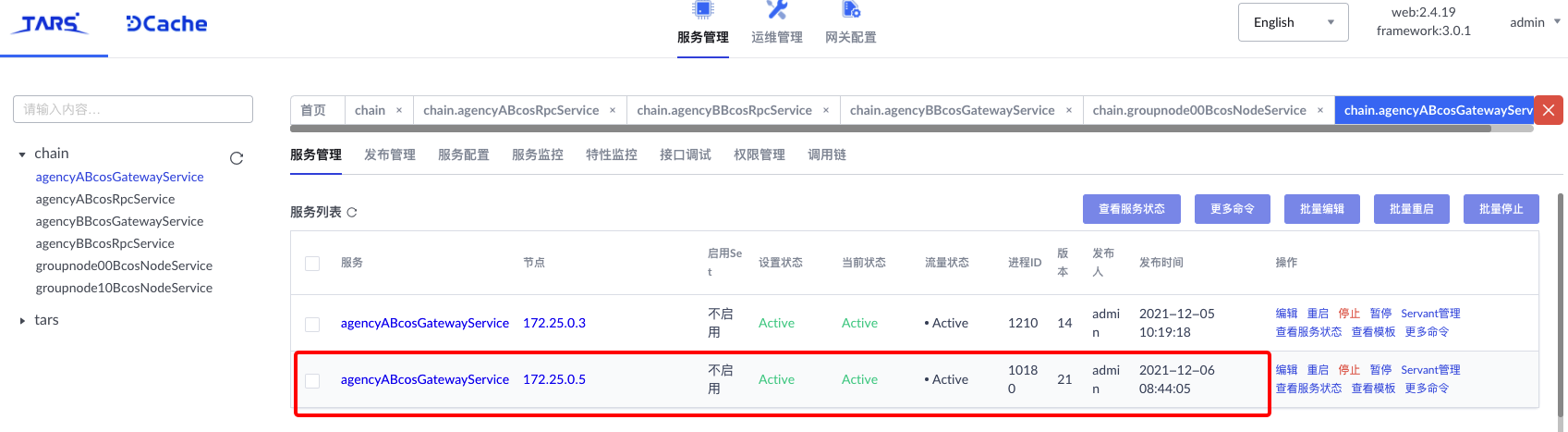
5. Obtain the newly expanded service information through the console
Note
For console configuration and deployment, see Configuring and Using the Console<./installation.html#id6>`_
Start the console and run the ‘getPeers’ command. The number of Gateway service nodes displayed on the console is increased from 2 to 3。
# Enter the operation directory
$ cd ~/fisco/console

# Start Console
$ bash start.sh
=============================================================================================
Welcome to FISCO BCOS console(3.0.0)!
Type 'help' or 'h' for help. Type 'quit' or 'q' to quit console.
 ________ ______  ______   ______   ______       _______   ______   ______   ______
|        |      \/      \ /      \ /      \     |       \ /      \ /      \ /      \
| $$$$$$$$\$$$$$|  $$$$$$|  $$$$$$|  $$$$$$\    | $$$$$$$|  $$$$$$|  $$$$$$|  $$$$$$\
| $$__     | $$ | $$___\$| $$   \$| $$  | $$    | $$__/ $| $$   \$| $$  | $| $$___\$$
| $$  \    | $$  \$$    \| $$     | $$  | $$    | $$    $| $$     | $$  | $$\$$    \
| $$$$$    | $$  _\$$$$$$| $$   __| $$  | $$    | $$$$$$$| $$   __| $$  | $$_\$$$$$$\
| $$      _| $$_|  \__| $| $$__/  | $$__/ $$    | $$__/ $| $$__/  | $$__/ $|  \__| $$
| $$     |   $$ \\$$    $$\$$    $$\$$    $$    | $$    $$\$$    $$\$$    $$\$$    $$
 \$$      \$$$$$$ \$$$$$$  \$$$$$$  \$$$$$$      \$$$$$$$  \$$$$$$  \$$$$$$  \$$$$$$

=============================================================================================
[group0]: /> getPeers
PeersInfo{
    p2pNodeID='3082010a0282010100c1d64abf0af11ceaa69b237090a5078ccbc122aedbf93486100ae65cb38cbf2a6969b80f2beca1abba7f0c1674876b332380a4b76387d62445ba8da7190b54850ed8c3fb4d6f6bafbd4744249a55805c0d804db9aa0f105c44c3381de20c763469892fc11a2bc8467c523592c9b2738069d6beb4cfb413f90e0be53205eca1cf3618100c625667f0592fd682aabe9cfbca7f7c53d79eeb5961ed9f144681b32c9fa55fc4d80b5ffbf32a9f71e900bc1c9a92ce0a485bb1003a915f9215bd7c42461cd52d1b2add644e8c1c273aa3668d4a707771b1a99d6bfcbfdf28be5b9c619eefb0c182ea7e666c5753c79499b1959df17ad5bd0996b9d7f0d62aa53d2b450203010001',
    endPoint='0.0.0.0:30301',
    groupNodeIDInfo=[
        NodeIDInfo{
            group='group0',
            nodeIDList=[
                4af0433ac2d2afe305b88e7faae8ea4e94b14c63e78ca93c5c836ece6d0fbcb3d2a476a74ae8fb0a11e9662c0ce9861427c314aea7386cb3b619a4cb21ab227a
            ]
        }
    ],
    peers=[
        PeerInfo{
            p2pNodeID='3082010a0282010100e2e86f2be399129723539792ed329a5392868129e2584bca7207c67fee62c3bbffd997a79c8669394dbf2c6ba3298d63b7a22fadaa01dce033578dbdbcb8156d894bee43a74ae7b7e0d9d9937aa6744f83065ed4e3c26673d16cf4c019f40cb590bbc8ae83069039accb0f1b01f456fc2129cdc51c43138b5f4026ac7e0f6a1d2f7d76e953e42d8721dcf08c63a58ea2735467054f96180db6b73146d0d7bd6e3910f72abe362eb87bdeb93415c2bbbb7e8ab96ffeca5fa84625f9372cb66412698315a3ef5a6f808148038f9211df730e55c24d109379df542bcfccbb022ec0e454a2751045881030ace5f584e60aff9607f11548af10f120b0f46113afbde70203010001',
            endPoint='172.25.0.5:35122',
            groupNodeIDInfo=[
                NodeIDInfo{
                    group='group0',
                    nodeIDList=[
                        8230e3ad1e7e929044a4ec8a5aca3c16744338a2fdd2865745aab9eef88f5a5c18b0d912a7a047966d112847d5c79eef46b32f7d9a2818adb601049126d289f3
                    ]
                }
            ]
        },
        PeerInfo{
            p2pNodeID='3082010a0282010100cd8978651421e2861330242b1736a1814e4f2654476ae177c81494c52aef4e30821689029bff53a6b8d671967e5ca52d40c821775013f663ce003acd40a037a2cf19ed2bb20b92cb519636aa7402499df8e9324a0120cd199de97330f5942cca54ebfd5abb425f5c9128cd7bfa3956281614d492c9858d24ddea336651926869cde4e329550708b78d657019ee19ab9024305b32ffa96ed81d04be9124dc74d8d320b570b446a0b95af051fecbf3e49a3d64daea8b044ae09e891a89e59e87ca3db65bc67c16b6787f804b19a158e957a7b8d734159677837d2cd28f85cc79559d38f64e757c4fa7246604542c01cec2a3805066c4d026b9a90091b0bf67efe30203010001',
            endPoint='172.25.0.3:30300',
            groupNodeIDInfo=[
                NodeIDInfo{
                    group='group0',
                    nodeIDList=[
                        8230e3ad1e7e929044a4ec8a5aca3c16744338a2fdd2865745aab9eef88f5a5c18b0d912a7a047966d112847d5c79eef46b32f7d9a2818adb601049126d289f3
                    ]
                }
            ]
        }
    ]
}