Expand new group
Tags: “Pro version of the blockchain network” “Expansion group”
Pro version FISCO BCOS blockchain system supports dynamic multi-group blockchain network, which can generate new groups and offline groups when the system is running。BcosBuilder
Provides online and offline functions for new groups. This chapter is in Building a Pro Blockchain NetworkOn the basis of the expansion, offline group ‘group2’, to help users master the Pro version of FISCO
BCOS blockchain system group expansion and offline steps。
Note
-Before expanding the new group, please refer to ‘here<./installation.html>’_ Build a Pro version of the blockchain network
1. Expand the new group
Here take the machine at IP ‘172.25.0.3’(Container)Two blockchain nodes with chain ID ‘chain’ and group ID ‘group2’ are used as examples to introduce the new group expansion。
1.1 Setting up a new group configuration
Note
In the actual operation, the tars token must be replaced with the tars web management platform [admin] ->User Center ->[token management] obtaining available tokens。
You can directly use the service deployment configuration template ‘conf / config-deploy-example.toml’ to configure the group ID to ‘group2’, as follows:
macOS System:
# Enter the operation directory
$ cd ~/fisco/BcosBuilder/pro

# Copy Configuration File
$ cp conf/config-deploy-example.toml config.toml

# Configure tars token: Through the tars web management platform [admin] ->User Center ->[token management] obtaining available tokens
# The token here is: eyJhbGciOiJIUzI1NiIsInR5cCI6IkpXVCJ9.eyJ1aWQiOiJhZG1pbiIsImlhdCI6MTYzODQzMTY1NSwiZXhwIjoxNjY3MjAyODU1fQ.430Gi
$ sed -i .bkp 's/tars_token = ""/tars_token = "eyJhbGciOiJIUzI1NiIsInR5cCI6IkpXVCJ9.eyJ1aWQiOiJhZG1pbiIsImlhdCI6MTYzODQzMTY1NSwiZXhwIjoxNjY3MjAyODU1fQ.430ni50xWPJXgJdckpOTktJB3kAMNwFdl8w_GIP_3Ls"/g' config.toml

# Configure Group ID
$ sed -i .bkp 's/group0/group2/g' config.toml

# Confirm that the group ID is modified successfully: Output group2
$ cat config.toml | grep -i group_id
group_id="group2"
Linux system:
# Enter the operation directory
$ cd ~/fisco/BcosBuilder/pro
# Copy Configuration File
$ cp conf/config-deploy-example.toml config.toml

# Configure tars token: Through the tars web management platform [admin] ->User Center ->[token management] obtaining available tokens
# The token here is: eyJhbGciOiJIUzI1NiIsInR5cCI6IkpXVCJ9.eyJ1aWQiOiJhZG1pbiIsImlhdCI6MTYzODQzMTY1NSwiZXhwIjoxNjY3MjAyODU1fQ.430Gi
$ sed -i 's/tars_token = ""/tars_token = "eyJhbGciOiJIUzI1NiIsInR5cCI6IkpXVCJ9.eyJ1aWQiOiJhZG1pbiIsImlhdCI6MTYzODQzMTY1NSwiZXhwIjoxNjY3MjAyODU1fQ.430ni50xWPJXgJdckpOTktJB3kAMNwFdl8w_GIP_3Ls"/g' config.toml

# Configure Group ID
$ sed -i 's/group0/group2/g' config.toml

# Confirm that the group ID is modified successfully: Output group2
$ cat config.toml | grep -i group_id
group_id="group2"
The configuration ‘config.toml’ of the new group ‘group2’ is as follows:
[chain]
chain_id="chain0"

[[group]]
group_id="group2"
# the genesis configuration path of the group, will generate new genesis configuration if not configurated
# genesis_config_path = ""
# VM type, now only support evm/wasm
vm_type = "evm"
# use sm-crypto or not
sm_crypto=false
# enable auth-check or not
auth_check=false
init_auth_address=""

# the genesis config
# the number of blocks generated by each leader
leader_period = 1
# the max number of transactions of a block
block_tx_count_limit = 1000
# consensus algorithm now support PBFT(consensus_type=pbft)
consensus_type = "pbft"
# transaction gas limit
gas_limit = "3000000000"
# compatible version, can be dynamically upgraded through setSystemConfig
# the default is 3.0.0
compatibility_version="3.0.0"

[[agency]]
name = "agencyA"
# enable data disk encryption for rpc/gateway or not, default is false
enable_storage_security = false
# url of the key center, in format of ip:port, please refer to https://github.com/FISCO-BCOS/key-manager for details
# key_center_url =
# cipher_data_key =

    [[agency.group]]
        group_id = "group0"
        [[agency.group.node]]
        node_name = "node0"
        deploy_ip = "172.25.0.3"
        # enable data disk encryption for bcos node or not, default is false
        enable_storage_security = false
        # url of the key center, in format of ip:port, please refer to https://github.com/FISCO-BCOS/key-manager for details
        # key_center_url =
        # cipher_data_key =
        monitor_listen_port = "3902"
        # monitor log path example:"/home/fisco/tars/framework/app_log/"
        monitor_log_path = ""

[[agency]]
name = "agencyB"
# enable data disk encryption for rpc/gateway or not, default is false
enable_storage_security = false
# url of the key center, in format of ip:port, please refer to https://github.com/FISCO-BCOS/key-manager for details
# key_center_url =
# cipher_data_key =

    [[agency.group]]
        group_id = "group0"

        [[agency.group.node]]
        node_name = "node0"
        deploy_ip = "172.25.0.3"
        # enable data disk encryption for bcos node or not, default is false
        enable_storage_security = false
        # url of the key center, in format of ip:port, please refer to https://github.com/FISCO-BCOS/key-manager for details
        # key_center_url =
        # cipher_data_key =
        monitor_listen_port = "3901"
        # monitor log path example:"/home/fisco/tars/framework/app_log/"
        monitor_log_path = ""
1.2 Expansion of New Groups
# Enter the operation directory
cd ~/fisco/BcosBuilder/pro

# Deploy new group
python3 build_chain.py chain -o deploy -t node
After the preceding command is executed, when the script outputs’ deploy all nodes of the given group success’, the new group is successfully scaled up by the blockchain node. The detailed log output is as follows:
=========================================================
----------- generate config for all nodes -----------
----------- generate genesis config for group group2 -----------
* generate pem file for agencyAgroup2node0BcosNodeService
	- pem_path: ./generated/chain0/group2/agencyAgroup2node0BcosNodeService/node.pem
	- node_id_path: ./generated/chain0/group2/agencyAgroup2node0BcosNodeService/node.nodeid
	- node_id: 721c2502ceb5a4c3017bfe41bd96c4be3229e4f65061879620fce2841dcc8ebe66438b0d8b8da0cf914493a7d7b9afb8c0b383c85c84a847180092d1d4661d63

	- sm_crypto: 0
* generate pem file for agencyBgroup2node0BcosNodeService
	- pem_path: ./generated/chain0/group2/agencyBgroup2node0BcosNodeService/node.pem
	- node_id_path: ./generated/chain0/group2/agencyBgroup2node0BcosNodeService/node.nodeid
	- node_id: 8aeeac84516ac678e9261a5acb8a509f9fce9e00986630975c6c48710640d8ff0c2460a9f321f0e412325ef55d80e59b418b6f376a26a0afe0a01fea22f7afe2

	- sm_crypto: 0
* generate_genesis_config_nodeid
* consensus_type: pbft
* block_tx_count_limit: 1000
* leader_period: 1
* gas_limit: 3000000000
* compatibility_version: 3.0.0
* generate_genesis_config_nodeid success
* store genesis config for chain0.group2
	 path: generated/chain0/group2/config.genesis
* store genesis config for chain0.group2 success
* store genesis config for agencyAgroup2node0BcosNodeService
	 path: ./generated/chain0/group2/agencyAgroup2node0BcosNodeService/config.genesis
* store genesis config for agencyAgroup2node0BcosNodeService success
* store genesis config for agencyBgroup2node0BcosNodeService
	 path: ./generated/chain0/group2/agencyBgroup2node0BcosNodeService/config.genesis
* store genesis config for agencyBgroup2node0BcosNodeService success
----------- generate genesis config for group2 success -----------
----------- generate ini config for group group2 -----------
* store ini config for agencyAgroup2node0BcosNodeService
	 path: ./generated/chain0/group2/agencyAgroup2node0BcosNodeService/config.ini
* store ini config for agencyAgroup2node0BcosNodeService success
* store ini config for agencyBgroup2node0BcosNodeService
	 path: ./generated/chain0/group2/agencyBgroup2node0BcosNodeService/config.ini
* store ini config for agencyBgroup2node0BcosNodeService success
----------- generate ini config for group group2 success -----------
----------- generate config for all nodes success -----------
deploy services for all the group nodes
deploy service agencyAgroup2node0BcosNodeService
deploy service agencyAgroup2node0BcosNodeService success
deploy service agencyBgroup2node0BcosNodeService
deploy service agencyBgroup2node0BcosNodeService success
=========================================================
The configuration related to the blockchain node generated during group expansion is located in ‘generated / \({chainID}/\){groupID}’Directory, as follows:
$ tree generated/chain0/group2
generated/chain0/group2
├── agencyAgroup2node0BcosNodeService
│   ├── config.genesis
│   ├── config.ini
│   ├── node.nodeid
│   └── node.pem
├── agencyBgroup2node0BcosNodeService
│   ├── config.genesis
│   ├── config.ini
│   ├── node.nodeid
│   └── node.pem
└── config.genesis
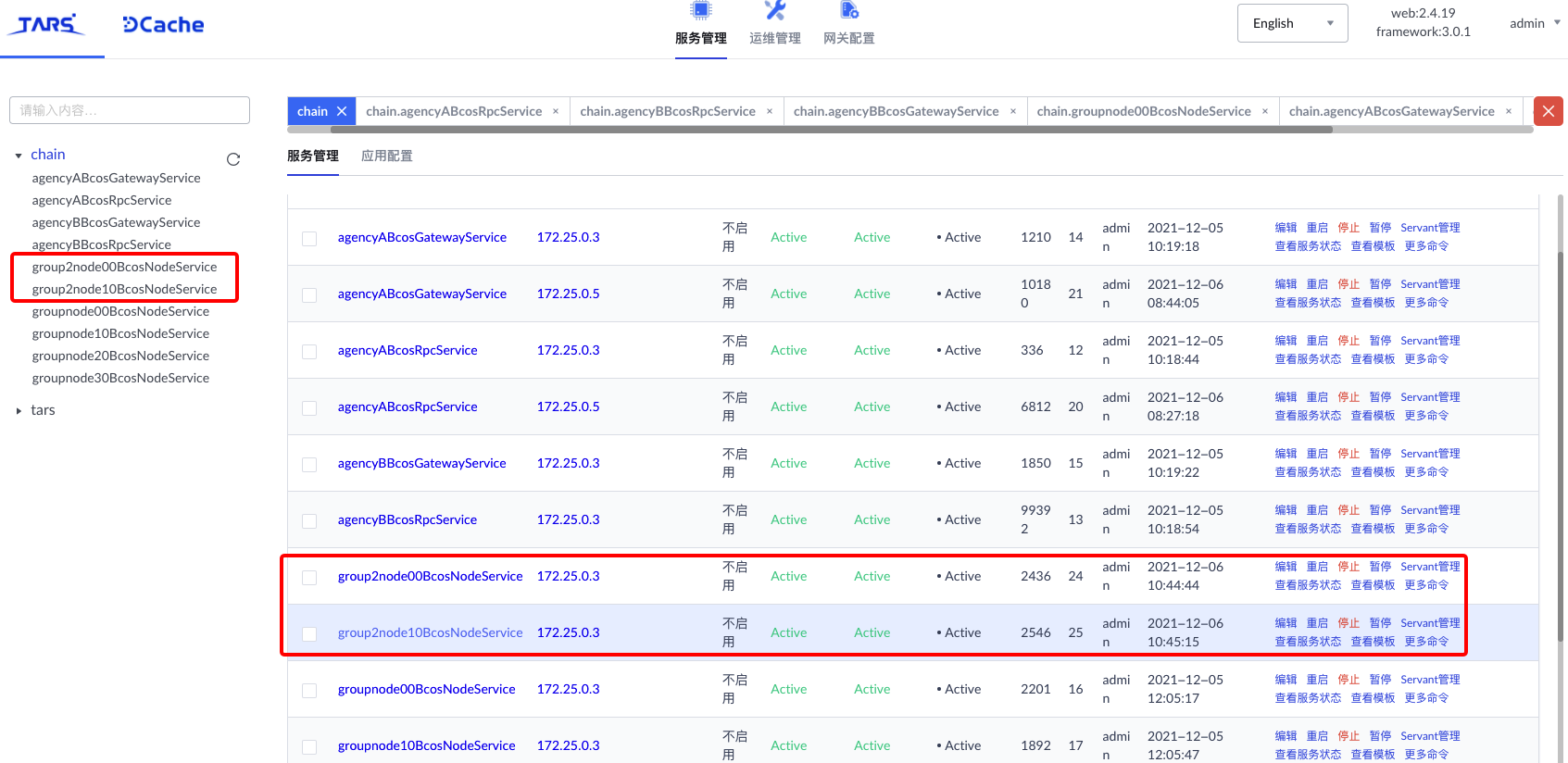
After the new group is successfully expanded, you can see the new blockchain services’ agencyAgroup2node0BcosNodeService ‘and’ agencyBgroup2node0BcosNodeService ‘on the tars web management platform:
2. Send a transaction to a new group
After the new group is deployed, you can use the console to directly connect to the new group ‘group2’ and send transactions to the new group。
$ bash start group2
=============================================================================================
Welcome to FISCO BCOS console(3.1.0)!
Type 'help' or 'h' for help. Type 'quit' or 'q' to quit console.
 ________ ______  ______   ______   ______       _______   ______   ______   ______
|        |      \/      \ /      \ /      \     |       \ /      \ /      \ /      \
| $$$$$$$$\$$$$$|  $$$$$$|  $$$$$$|  $$$$$$\    | $$$$$$$|  $$$$$$|  $$$$$$|  $$$$$$\
| $$__     | $$ | $$___\$| $$   \$| $$  | $$    | $$__/ $| $$   \$| $$  | $| $$___\$$
| $$  \    | $$  \$$    \| $$     | $$  | $$    | $$    $| $$     | $$  | $$\$$    \
| $$$$$    | $$  _\$$$$$$| $$   __| $$  | $$    | $$$$$$$| $$   __| $$  | $$_\$$$$$$\
| $$      _| $$_|  \__| $| $$__/  | $$__/ $$    | $$__/ $| $$__/  | $$__/ $|  \__| $$
| $$     |   $$ \\$$    $$\$$    $$\$$    $$    | $$    $$\$$    $$\$$    $$\$$    $$
 \$$      \$$$$$$ \$$$$$$  \$$$$$$  \$$$$$$      \$$$$$$$  \$$$$$$  \$$$$$$  \$$$$$$

=============================================================================================

# Get current group list
[group2]: /> getGroupList
["group", "group2"]

# Obtain the NodeID list of blockchain nodes in group 2
[group2]: /> getGroupPeers
peer0: 93d51a1a3af71dda7015d7be88818ef4f3e674cd0681e8184690ac0f504aee1148023eda30e3075958accda62e35161f42312ed4b56f44e23ae2e81c07734c60
peer1: a6448fd526eb90438621d653e59cd2c850cf60953cdf702471e62731b4363412f05319f92aa141c38031d9bf1d3d2067e5430585cfe8f38d74ebc20e6dacf9b3


# Deploying the hello _ world contract
[group2]: /> deploy HelloWorld
transaction hash: 0x796b573aece250bba891b9251b8fb464d22f41cb36e7cae407b2bd0a870f5b72
contract address: 0x6849F21D1E455e9f0712b1e99Fa4FCD23758E8F1
currentAccount: 0x7b047472a4516e9697446576f8c7fcc064f967fa

# Get current block height
[group2]: /> getBlockNumber
2

# The get method that calls the hello _ world contract in the tmp2 directory is to output Alice
[group2]: /> call HelloWorld 0x6849F21D1E455e9f0712b1e99Fa4FCD23758E8F1 get
---------------------------------------------------------------------------------------------
Return code: 0
description: transaction executed successfully
Return message: Success
---------------------------------------------------------------------------------------------
Return value size:1
Return types: (string)
Return values:(Hello, World!)
---------------------------------------------------------------------------------------------

# Set the name of hello _ world to"Hello, Fisco"
[group2]: /> call HelloWorld set "Hello, Fisco"
transaction hash: 0x2f7c85c2c59a76ccaad85d95b09497ad05ca7983c5ec79c8f9d102d1c8dddc30
---------------------------------------------------------------------------------------------
transaction status: 0
description: transaction executed successfully
---------------------------------------------------------------------------------------------
Receipt message: Success
Return message: Success
Return value size:0
Return types: ()
Return values:()
---------------------------------------------------------------------------------------------
Event logs
Event: {}

# Get updated name
[group2]: /> call HelloWorld get
---------------------------------------------------------------------------------------------
Return code: 0
description: transaction executed successfully
Return message: Success
---------------------------------------------------------------------------------------------
Return value size:1
Return types: (string)
Return values:(Hello, Fisco)
---------------------------------------------------------------------------------------------

# Get current block height
[group2]: /> getBlockNumber
3
3. Offline group
‘BcosBuilder ‘also provides a new group offline function,Before taking a group offline, make sure that the group is no longer in use。
The steps for the offline group ‘group2’ are as follows:
# Enter the operation directory
cd ~/fisco/BcosBuilder/pro

# Offline group group2: Make sure that config.toml is the configuration file used during group group2 expansion
python3 build_chain.py chain -o undeploy -t node
After the preceding command is executed, when the script outputs’ undeploy all nodes of the given group success’, it indicates that the blockchain node has successfully offline the new group. The detailed log output is as follows:
=========================================================
----------- undeploy all nodes of the given group -----------
undeploy services for all the group nodes
undeploy service agencyAgroup2node0BcosNodeService
undeploy service agencyAgroup2node0BcosNodeService success
undeploy service agencyBgroup2node0BcosNodeService
undeploy service agencyBgroup2node0BcosNodeService success
----------- undeploy all nodes of the given group success -----------
=========================================================
At this point, the information of the offline group ‘group2’ cannot be queried through the console:
$ bash start.sh
# Get current group list
[group0]: /> getGroupList
["group"]