10. Version Upgrade Guide
This document mainly discusses the upgrade of FISCO BCOS from three aspects to answer the upgrade requirements of community users in the actual application of FISCO BCOS。From easy to difficult, from near to far, the idea is divided into the following three parts: -The first part, how to implement the upgrade between FISCO BCOS 3.x versions;
Part 2, How to implement an upgrade between FISCO BCOS Air, Pro and Max; -Part III, how to upgrade from FISCO BCOS 2.0 to 3.0。
1. Upgrade between FISCO BCOS 3.x versions
Each version of FISOC BCOS will add new features to the original version。There are two upgrade methods, which can be selected according to the upgrade requirements:
Improve system stability and performance: only upgrade node executable programs
Use new features: upgrade node executable, upgrade chain data version
1.1 Upgrade node executables
Upgrade effect: fix bugs, and bring stability, performance improvement
Operation steps: gradually stop the node service, upgrade the node executable to the current version, and restart the node service
Note: It is recommended to gradually replace the executable program for gray-scale upgrade, and back up all the account book data of the original node before upgrading. If the upgrade fails due to operation errors, the original data can be rolled back to the state before upgrading
Version supported for upgrade: v3.0.0+
1.2 Upgrade Chain Data Version
Upgrade effect: can use the latest features of the current version
-Operation steps: first complete the upgrade of all node executable programs, and then refer to the following steps, by sending the transaction upgrade chain data version to the new version v3.x.x
Note: Be sure to back up all the ledger data of the original node. If the upgrade fails due to an error, the original data can be rolled back to the status before the upgrade
The detailed steps for upgrading a data-compatible version number are as follows:
a. Query data compatibility version number (compatibility _ version)
Use consoleQuery, such as the current version returned is 3.0.1
[group0]: /apps>  getSystemConfigByKey compatibility_version
3.0.1
b. Replace Node Binary
Need to beAll NodesGradually replace the binary with the current version。In order not to affect the business, the replacement process can be done in grayscale, replacing and restarting nodes one by one。During the replacement process, the current chain continues to execute with the logic of the old data-compatible version number。After the binary replacement of all nodes is completed and restarted, you need to use the console to modify the data compatibility version number to the current version。
c. Turn on the new version feature
Starting from versions 3.2.4 and 3.6.0, FISCO BCOS provides the ability to enable new features and problem fixes on demand. The list of problem fixes and new features is as follows:
| Feature Name | Type | Role | Minimum Version |
|---|---|---|---|
| bugfix_revert | Problem Fixes | Fix when using serial mode(is_serial=true)The problem that the written state data is not revoked after the smart contract is rolled back | 3.2.4 3.6.0 |
| bugfix_statestorage_hash | Problem Fixes | ||
| bugfix_evm_create2_delegatecall_staticcall_codecopy | Problem Fixes | ||
| bugfix_event_log_order | Problem Fixes | ||
| bugfix_call_noaddr_return | Problem Fixes | ||
| bugfix_precompiled_codehash | Problem Fixes | ||
| bugfix_dmc_revert | Problem Fixes | Fix when using DMC mode(is _ serial = false, feature _ sharding is not enabled)The problem that the written state data is not revoked after the smart contract is rolled back | |
| bugfix_keypage_system_entry_hash | Problem Fixes | ||
| bugfix_internal_create_redundant_storage | |||
| feature_dmc2serial | New Features | 3.2.4 | |
| feature_sharding | New Features | ||
| feature_rpbft | New Features | ||
| feature_paillier | New Features | ||
| feature_balance | New Features | ||
| feature_balance_precompiled | New Features | ||
| feature_balance_policy1 | New Features | ||
| feature_paillier_add_raw | New Features | ||
| feature_predeploy | New Features |
Enable problem fixes or new features, execute in the console
setSystemConfigByKey <Special Name>
d. Set the data compatibility version number (compatibility _ version)
Use consoleSet the data compatibility version number, for example, upgrade to 3.1.0。
[group0]: /apps>  setSystemConfigByKey compatibility_version 3.1.0
{
    "code":0,
    "msg":"success"
}

Note: If the permission governance function is enabled, you need to use the setSysConfigProposal command
Set successfully, query again, the current version has been upgraded to 3.1.0
[group0]: /apps>  getSystemConfigByKey compatibility_version
3.1.0
The current chain has been upgraded. At this point, the chain continues to run with new logic and supports new version features。
After setting the chain version number, chains of 3.6.x and above will automatically enable all bugfixes of the minimum version and above。
2. Upgrade between FISCO BCOS Air, Pro and Max
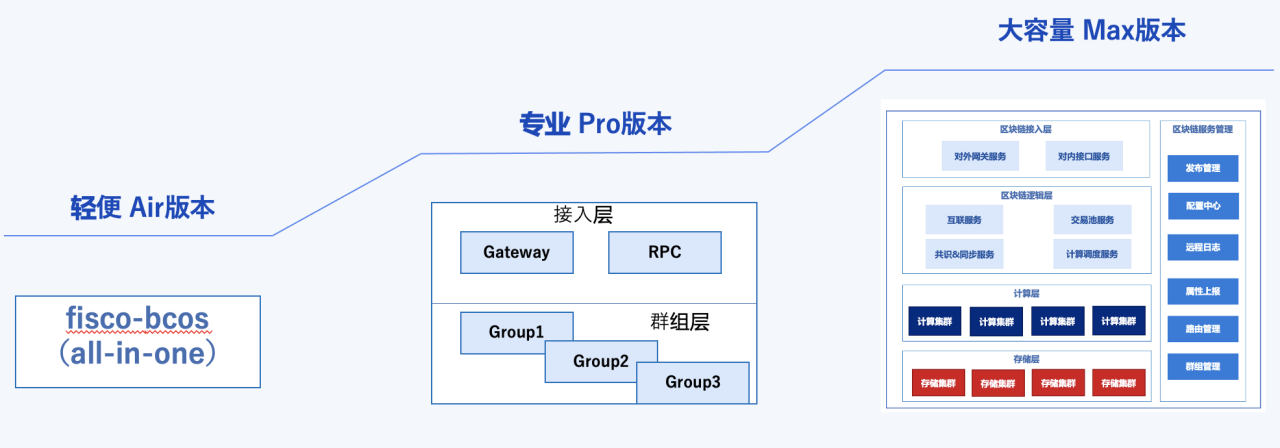
Through deep research on the demands of users in different scenarios, FISCO BCOS has launched three different deployment types: Air, Pro and Max. Users can customize their choices according to their needs。However, in the actual application process, with the change of business and needs, users have the need to upgrade Pro and Pro to upgrade Max。Based on this background, this section explores upgrade operations between the three deployment types。
注意: Make sure to back up the data before upgrading to ensure that the chain can be rolled back to the state before upgrading。
2.1 Air to Pro Upgrade
To implement the Air upgrade Pro, you need to understand the differences in technical architecture and deployment between the two。
Similarities: The underlying storage database between Air and Pro is RocksDB
Different points: Air adopts all-in-one encapsulation mode, Pro by group layer+The architecture of the access layer provides services
Based on the similarities and differences between Air and Pro, there are two options for upgrading Air to Pro:
Based on the existing Air node, expand a Pro node
Based on the current Air node, upgrade its refactoring to Pro node
The specific scheme is described as follows。
Solution 1: Air Blockchain Expansion Pro Node
Based on the existing Air node, expand a pro node on its basis, so that you can save the previous Air on-chain data, expand the Pro node and meet the business needs。The advantage of this solution is that it is simple to operate and does not require changes to the existing organizational structure。The detailed steps are as follows:
Use the BcosBuilder deployment tool to deploy the tar service. For specific steps, please refer to Building a Pro Blockchain Networkand Pro Expansion Node;
Before deploying the pro node, configure the config-node-expand-example.toml file in the pro / conf directory and configure the path of the Air Genesis block file;
Download the binary, deploy the Pro node according to the configuration file, and replace the ca file of Pro generated by expansion with the root certificate of Air. For specific expansion steps, please refer to Pro Node Expansion;
Start the Pro node, connect the Pro node through the console, and add the Pro node to the Air blockchain network;
After the pro node is synchronized to the latest block, the user can choose whether to offline the Air node service。
Through the above steps, you can expand the Pro version of the node on the basis of the original Air, and then realize the upgrade from Air to Pro, users can also further expand the Pro network in the process of business use。
Scheme 2: Air blockchain reconstruction and upgrade
The underlying storage mode of Air is the same as that of Pro, and the blockchain data of Air is still available after upgrading to Pro version。Therefore, in theory, you only need to refactor the Air directory structure to the Pro directory structure, deploy the relevant Pro services, and then reuse the previous Air data to the corresponding Pro directory。The detailed steps for this scenario are as follows:
Stop the Air node and save the data and chain configuration information on the chain: backup the data of the Air node, such as the data directory, the creation block, the config.ini configuration file, and the certificate;
According to the directory structure of the Pro version, the directory file structure of the Air chain is reconstructed into the directory structure of Pro;
Deploy the Pro version of RPC, getawat, node and other services through the BcosBuilder deployment tool;
Deploy the Pro chain through the BcosBuilder deployment tool step, and replace the files in the Genesis block, config.ini, certificate, and chain data data directory with the related files of the previous Air;
Import the Air data, import the previously backed up Air data to the data directory of the pro node, and start the node。
Through the above operation, the user can replace the original Air network with the Pro network, which is more complicated than the operation of Scheme 1, requiring the user to have a deeper understanding of the organizational structure of Air in Pro。
2.2 Pro to Max Upgrade
Because Pro and Max use different storage architectures: Pro uses a stand-alone RocksDB with outstanding performance, while Max uses a distributed storage architecture tikvDB。So in Pro upgrade to Max, the ledger data cannot be reused。In this case, only the expansion scheme can achieve the Pro version upgrade Max。Specific programs are as follows:
Solution: Pro blockchain scaling Max node
The specific steps for scaling the Pro blockchain Max node are as follows:
Use the BcosBuilder deployment tool to install dependencies, install and configure the Tars service;
Download and install tiup, deploy and start Tikv;
Download the relevant binaries of Max and modify the sample configuration file config-node-expand-example.toml in the BcosBuilder / max / conf directory to configure the creation block path(Genesis Block File for Pro Blockchain)and other related information;
Deploy the Max node service, expand the Max node, and replace the generated ca file of the max node directory with the root certificate of the original Pro chain after the expansion is completed. For specific steps, please refer to Building a Max Blockchain Network;
Start the Max node, connect the Max node through the console, add the Max node to the original Pro blockchain network, and check whether the chain is running normally。After the Max node is synchronized to the latest fast, you can choose whether to offline the Pro node。
Through the above steps, the Pro network expansion Max, the original Pro network service upgrade, users can experience the large-capacity Max version of the function, the same support in the subsequent use to continue to increase the expansion Max node。
3. FISCO BCOS 2.0 Upgrade to 3.0 Guidelines
FISCO BCOS 3.0 has been upgraded and optimized on the basis of 2.0, and has made major breakthroughs in scalability, performance and ease of use, including:
Pipelined: Block pipelining to generate blocks continuously and compactly;
Omni-directional parallel computing: parallel mechanisms such as intra-block sharding, DMC, DAG, etc., to achieve powerful processing performance;
Blockchain file system: WYSIWYG Contract Data Management;
Permission governance framework: Built-in permission governance framework, multi-party voting governance blockchain;
Distributed storage TiKV: Distributed transactional commit, supporting mass storage;
Due to FISCO BCOS 3.0+Version 2.0 has undergone a number of major refactorings and is not perfectly backwards compatible。However, some users who have already launched version 2.x have an upgrade value of 3.0+demand of。To solve this problem, several feasible upgrade options are listed below, each with different advantages and disadvantages, suitable for different business scenarios。
注意Before upgrading, make sure to back up your data to ensure that it can be rolled back。
Scenario 1: Data Replay
Data replay is currently one of the most common blockchain data migration methods because it is simple, intuitive, and has relatively few side effects。
Implementation method:
Use the latest version of the link script to build a 3.0+new chain;
Use the data export component to quickly export data on the blockchain to obtain the execution history and detailed data of all methods and contracts on the chain;
Write a program or script to replay the exported data according to the block height。Enables contracts and transactions on the old chain of the production environment to be re-executed on the new chain at the original runtime。
Advantages of this program: -Simple, intuitive, small side effects, even if the upgrade fails does not affect the old chain operation
The disadvantages of this programme are: -Long replay time: It is not suitable for long-running massive data scenarios. If the transaction block height exceeds 3 million, the replay time will exceed 1 month (assuming that the consensus and block time period is 1s); -There is no guarantee of the order of execution of the same block: even when replaying, transactions are submitted and sent in the order of the block, but the order of execution of transactions within the same block is still random; -There is no guarantee that transactions will fall accurately on the original block height: due to the random nature of the cycle and order of the block packaging consensus, it is difficult to guarantee the number and order of transactions under the specific block height when replaying。
Therefore, this solution is suitable for scenarios where the consistency requirements for contract data are not strict, but there are certain requirements for data integrity;Not suitable for scenarios with very strict data consistency and massive data。
Scheme 2: Application layer adaptation
The core design of this scheme does not need to change the history chain and data, but provides a layer of data adaptation layer between the old and new chains to shield the details of the chain, so it can reduce the data operation on the chain。The completeness and accuracy of historical data is also the biggest advantage of this program。
Implementation method: Users can develop a data adaptation application that is compatible with the old and new chains, and route different data by using features such as data ID or date as a sign of route differentiation。At the same time, the new chain copies the old chain of smart contracts。
Advantages of this program:
Good historical data integrity and accuracy
The disadvantages of this programme are:
Data isolation: The data between the new chain and the old chain is physically isolated, so this solution cannot be adopted in scenarios where the new and old data are dependent; -High maintenance cost: the old and new chains must be maintained, and the maintenance cost of hardware is high; -High development cost: a set of independent data routing adaptation layer must be developed, and the development cost is high。
Therefore, this solution is suitable for scenarios where there is no dependency between parts of the data;And some scenarios where data is strongly dependent, such as points, payments and settlements, are not applicable。In addition, this solution requires the development of additional data adaptation procedures, the difficulty of which depends on the specific contract and scenario, but the subsequent maintenance costs are very high。
Scheme III: Cross-chain Scheme
This scheme is similar to the second scheme, the new chain and the old chain as two chains, the transaction involves the old chain data using the cross-chain platform to initiate cross-chain transaction requests, this scheme also does not need to change the historical chain and data, compared to the second scheme does not need to develop a set of independent data routing adaptation layer。
Implementation method: First, use the newly created chain script to build a new chain, connect the two chains through the cross-chain platform WeCross, the new business is processed by the new chain, the transaction involves historical data cross-chain platform to initiate cross-chain transaction requests, routed to the two chains to process, the processing results are stored in the two chains。
Advantages of this program:
Low development costs, no need to develop data adaptation applications;
Completeness and accuracy of historical data。
Disadvantages of this program: -Slow transaction execution: cross-chain transaction processing is slow, performance is not high, and every transaction in the previous period is a cross-chain transaction; -High maintenance cost: the old and new chains must be maintained, and the maintenance cost of hardware is high。
In this scheme, the performance of the new chain is low in the early stage of construction, and the frequent cross-link routing requires higher network requirements。