9. Authority governance system design
Tags: “contract permissions” “deployment permissions” “permission control” “permission design”
FISCO BCOS 3.x introduces the authority governance system of contract granularity。The governance committee can manage the deployment of the contract and the interface call permission of the contract by voting。
Please refer to the link for detailed permission governance usage documentation: Permission Governance Usage Guide
Overall design
In the FISCO BCOS3.0 framework, the governance system is implemented by a system contract, which provides relatively flexible and versatile functional modules that meet the demands of almost all scenarios while ensuring pluggability。
1. Role division
In FISCO BCOS3.0, on-chain roles can be divided into three categories according to their responsibilities: governance roles, contract administrator roles, and user roles, which are managed and managed in turn。
Governance role: Governance of chain governance rules, governance committees, top chain managers。Including: governance rule setting, governance committee election, account freezing, unfreezing, etc。At the same time, the governance role can control the role of the lower-level contract administrator。
Contract Administrator Role: The Contract Administrator role manages access to contract interfaces。For on-chain participants, any user can deploy contracts when the contract administrator does not set contract deployment permissions。The contract deployment account can specify the contract administrator account when deploying the contract, if not specified, the contract administrator defaults to the contract deployer。It should be noted that once the governance committee finds that the contract administrator has not performed his or her duties as contract administrator, the contract administrator can be reset by a vote of the governance committee。
User RolesA user role is a role that participates in the business. Any account (including the governance role and the contract administrator role) belongs to the user role。Whether the user role can participate in the relevant business (issuing transactions) depends on whether the contract administrator has set the relevant permissions。If the contract administrator does not set a permission type for the contract interface (blacklist or whitelist mode), anyone can call the contract interface。If the whitelist is set, you can only access it when the whitelist is hit. If the whitelist is in blacklist mode, you cannot access the corresponding interface if the whitelist is hit。
2. Governance rules management
Governance role through the governance module to complete the governance committee election, and set governance rules, such as the voting weight of each governance committee member, the turnout and participation rate in the governance decision-making process。Also set contract deployment permissions;
The contract administrator role deploys business contracts and sets permissions on business contract-related interfaces;
User roles complete business operations by calling the contract interface。
Detailed design
1. Governance module
The governance module provides governance functions, which are completed by the governance committee through multi-party voting according to the decision rules。The governance contract data structure is as follows
/ / address list of governors
LibAddressSet.AddressSet private _governorSet;
/ / weight mapping table
mapping(address => uint32) private _weightMapping;
/ / Participation threshold in percent
uint8 public _participatesRate;
/ / Proposal Pass Threshold in percent
uint8 public _winRate;
Types of governance proposals
The types of proposals of the Governance Committee mainly include the following types
MetaGovernance classes: add, remove members, modify governance member weights, modify thresholds for voting, set deployment permissions, proposal voting, and withdrawal。
Permission Class: Reset Contract Agent。
Governance Committee Decision Planning
Decision rules make decisions based on data from three dimensions: the weight of the governor’s voting rights, turnout and participation。When the governance committee has only one administrator, it degenerates to the administrator model, and all proposals pass。If the governance committee has more than one yes, it will be judged by the following rules。When the manager changes, all outstanding decision proposals are decided according to the new manager parameters。
First, for the participation rate threshold, the range of values is 1-100。When the participation rate threshold is set to 0 Yes, the participation rate threshold rule is invalid。When the participation rate threshold is adjusted, all outstanding decision proposals are decided according to the new participation rate threshold。The participation rate threshold decision can be calculated according to the following formula, and if not satisfied, the status of the proposal is’ noEnoughVotes’。
Total Voting Weight / Total Weight>= Participation threshold
Second, for the weight pass rate threshold, the range of values is 0-100。When the weight pass rate threshold is set to 0, the weight pass rate threshold rule fails。When the weight pass rate threshold is adjusted, all proposals for outstanding decisions are decided according to the new weight pass rate threshold。The weight pass rate threshold decision can be calculated as follows。If established, the representative proposal has been passed, if not established, the representative proposal has failed。
Total consent weight / total voting weight>= Weight Pass Rate Threshold
Governance operation process
Initial phase
To simplify the initialization operation and improve the user experience, you only need to configure one account as the initial member of the governance committee when building the chain。If not specified, the system will automatically randomly generate a private key, as a member of the governance committee, the administrator weight is 1, the turnout threshold and participation threshold are 0, that is, after initialization, the governance committee is administrator mode。
Operation phase
During the operational phase, the governance committee operates on the meta-governance class, the permission class。All operations can be divided into proposal, voting, decision-making through the automatic execution of the stage。
2. Permission Module
Permission Management
Permissions include creation permissions, contract access management permissions, and table access management permissions。
Create Contract Permissions: Permissions to deploy contracts, managed by the governance committee。
Contract Access Management: Access to the contract interface, managed by the contract administrator。
The so-called contract administrator mode, that is, when the contract is deployed, an account is designated as the administrator of the contract to manage the access rights of the relevant interface。For contract or table access, the main reason for using the contract administrator model instead of the governance committee model for permission management is to consider the user experience and decision efficiency。At the same time, the contract administrator can be modified by the governance committee to ensure the security of contract authority management。
Permission Policy
Considering the efficiency of rights management operations, the rights module provides two rights management policies: whitelist mode and blacklist mode。
-Whitelist mode: When an account is in the interface whitelist, the account can access the current interface; -Blacklist mode: When the account is in the interface blacklist, the account cannot access the current interface;
Operation process
The operation process of contract authority is as follows。
Deployment policy setting: The governance committee decides to set the deployment policy of the group, and selects whether it is a blacklist or a whitelist。
Access policy setting: The contract administrator has the right to set the ACL policy of the contract access interface, and select the blacklist or whitelist mode。The contract administrator directly invokes the setMethodAuthType of the permission contract(address contractAddr, bytes4 func, uint8 acl)to set the type of ACL。
Add access rules。Contract administrator can choose to add rules for access。then all rules are saved in mapping\ [methodId]\ [account] [bool]
3. Contract Design
For the address of the permission management contract, see https://github.com/FISCO-BCOS/bcos-auth
Major contracts include:
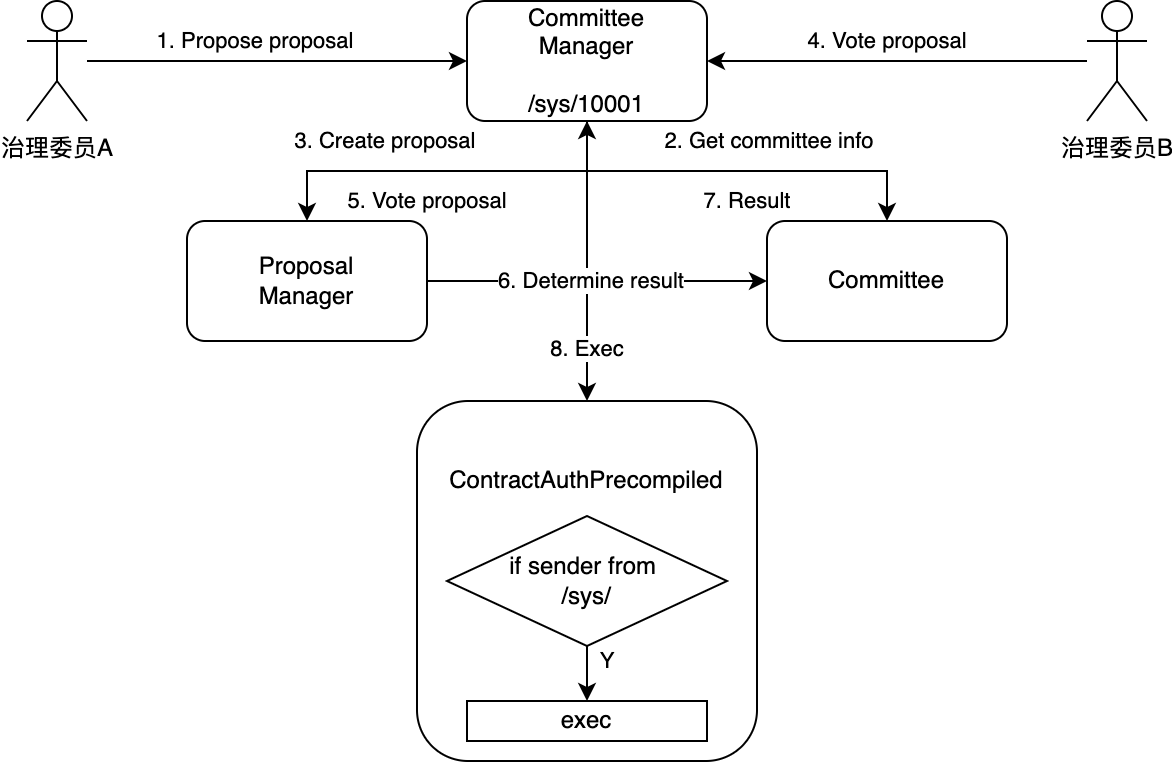
CommitteeManager: the only entry point for permission governance, management proposal and governance committee, governance committee can call the corresponding interface of the contract to initiate governance proposal。The underlying node has a unique address 0x10001
ProposalManager: proposal management contract, managed by the CommitteeManager, for storing proposals
Committee: governance committee contract, managed by the CommitteeManager, records governance committee information -ContractAuthPrecompiled: Permission information read and write interface provided by the underlying node, the write interface has permission control, and the underlying node has a unique address 0x1005
Permission governance performs the following steps:
Governance member A initiates a proposal to modify the system configuration and calls the CommitteeManager interface
The CommitteeManager obtains relevant information about the governance committee from the existing Committee
CommitteeManager calls ProposalManager, creates a proposal and pushes into the proposal list
Governance Committee B calls the CommitteeManager interface to vote on the proposal
CommitteeManager calls ProposalManager, votes on the proposal, and writes to the voting list
The ProposalManager collects the voting results of the proposal and calls the Committee interface to confirm whether the proposal threshold is reached
Committee returns the confirmation result
After the CommitteeManager confirms the status of the proposal and reaches the executable state, it initiates a call to ‘SystemConfigPrecompiled’ or ‘SensusPrecompiled’
The system pre-compilation contract will first confirm whether the called sender starts with / sys /, and then execute。(CommitteeManager is a built-in on-chain contract with a fixed address / sys / 10001)
4. Bottom Node Design
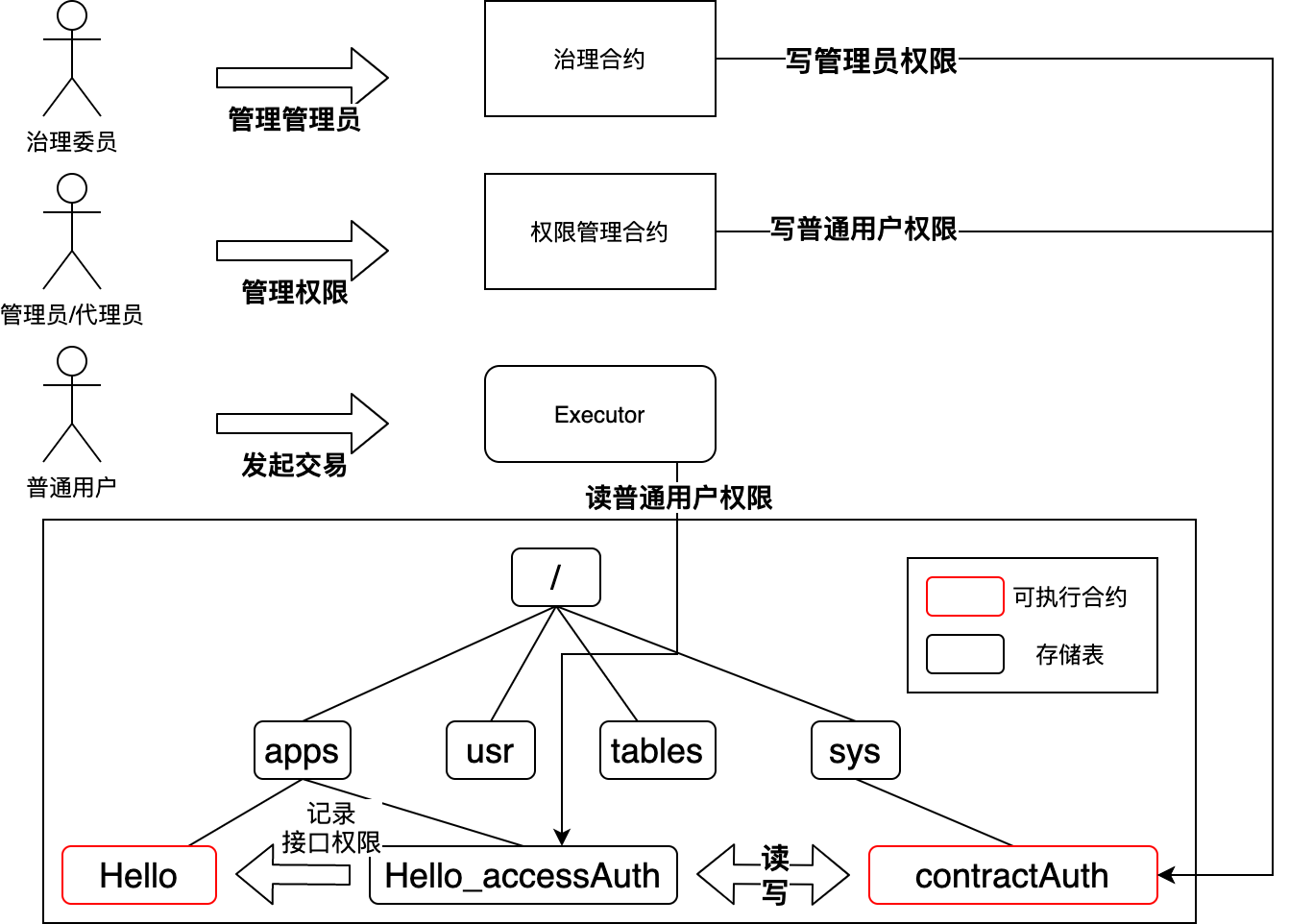
Each time a contract is deployed, it will be created in the same directory with the contract name+Storage table of “_ accessAuth” for storing interface-to-user whitelist data。
The underlying layer can directly access the storage through the table name to obtain permission information。In order for solidity and liquid to access the permission table corresponding to the directory contract, open the / sys / contractAuth system contract, you can access the permission storage table corresponding to the contract by accessing the / sys / contractAuth method to determine the permissions。
concrete realization
Create a permission table when creating a contract: When executing the creation, you can create an additional permission table。
Provide the read and write operation interface of the permission table: provide the / sys / contractAuth system contract, which is specially used as the system contract to access the permission table。Solidity uses the 0x1005 address。
System contract ContractAuth interface
function getAdmin(address contractAddr) public view returns (address) {}

function resetAdmin(address contractAddr, address admin)
        public returns (int256);

function setMethodAuthType(
        address contractAddr, bytes4 func, uint8 authType)
        public returns (int256);

function openMethodAuth(
        address contractAddr, bytes4 func, address account)
        public returns (int256);

function closeMethodAuth(
        address contractAddr, bytes4 func, address account)
        public returns (int256);

function checkMethodAuth(
        address contractAddr, bytes4 func, address account)
        public view returns (bool);

function deployType() public view returns (uint256);

function setDeployAuthType(uint8 _type) public returns (int256);

function openDeployAuth(address account) public returns (int256);

function closeDeployAuth(address account) public returns (int256);

function hasDeployAuth(address account) public view returns (bool);