intra-block fragmentation
Label: “sharding” “shard” “trade execution” “
Concept
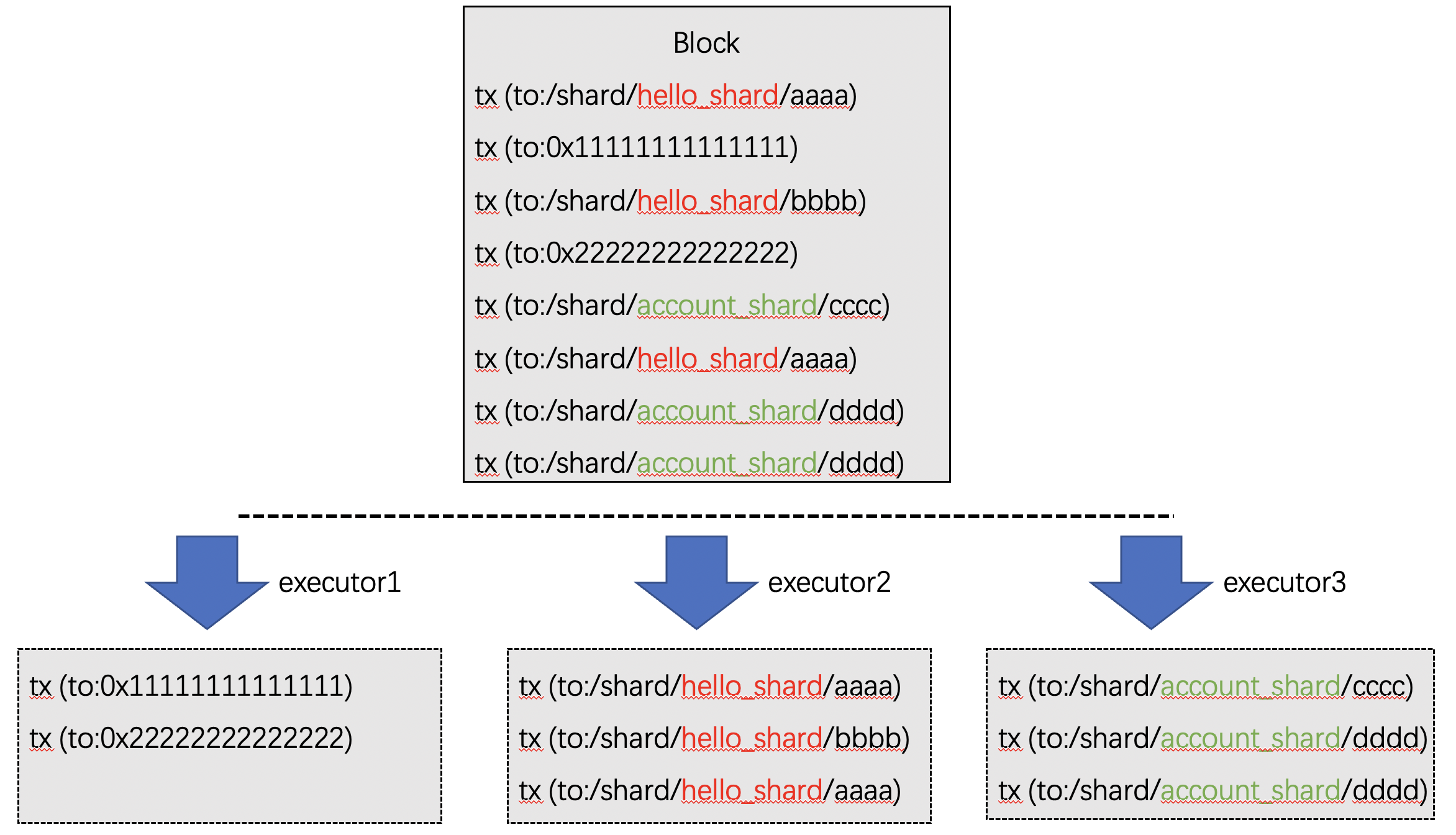
When multiple applications are hosted on a blockchain, the “intra-block fragmentation”Technology enables parallelization of inter-application transaction execution。
Grouping contracts on the chain in FISCO BCOS support。When executing transactions within a block, the transactions within a block are split into multiple “intra-block fragmentation”Hereinafter referred to as: shards), transactions of the same shard are scheduled to be executed in the same executor。
方案
Key point
Parallel: Different shards within a block are scheduled for parallel execution in different executors。
Local: The mutual invocation of contracts within the shard is done directly in the same executor, and the shards do not interfere with each other。
Cross-shard: Cross-shard calls are made directly in a block, transparent to the user, and its scheduling is based on the DMC mechanism to avoid heavy SPV proof。
Configuration: Users can manage the shards to which contracts belong in the console
Inheritance: Contracts deployed within a shard belong to the same shard, eliminating tedious shard management operations。
Implementation
The implementation method is as follows:
Parallel: Architecture based on FISCO BCOSImplement scheduling of multiple executors。
Local: inside an executor, executed in parallel using DAG。
Cross-shard: Cross-shard transactions are scheduled using DMC mechanism, completed within a block while ensuring consistency and existence。
Configuration: Based on BFSRealize contract shard management, start the console, use the linkShard command to bind the contract to the shard, and use the ls command to view the shard information。
Inheritance: Contracts deployed within a shard automatically inherit the shard configuration
Example
shard 1: ‘/ shard / hello _ shard’
/shard/hello_shard/hello1
/shard/hello_shard/hello2
/shard/hello_shard/hello3
shard 2: ‘/ shard / account _ shard’
/shard/account_shard/alice
/shard/account_shard/bob
/shard/account_shard/charies
Operation Example
This operation requires the use of the console, please refer to hereDeployment Console。Please refer to here for fragment management operations。
Deployment contract
Deploy two contracts: Asset, HelloWorld
[group0]: /apps> deploy Asset
transaction hash: 0x8dbee4602da3d3435ce73df3778ee975b650cfaf70ce6b53f14db6db478cec10
contract address: 0xcceef68c9b4811b32c75df284a1396c7c5509561
currentAccount: 0x988e6a553f434be3d37786c97abb1fe1f8b7341d

[group0]: /apps> deploy HelloWorld
transaction hash: 0xcb860822f8d74ac447fc3d18870109a202ff788a6b1ef32970fa53497ba386d5
contract address: 0xd24180cc0fef2f3e545de4f9aafc09345cd08903
currentAccount: 0x988e6a553f434be3d37786c97abb1fe1f8b7341d
Create shard
Create two shards: account _ shard and hello _ shard
[group0]: /apps> makeShard account_shard
make shard account_shard Ok. You can use 'ls' to check

[group0]: /apps> makeShard hello_shard
make shard hello_shard Ok. You can use 'ls' to check

[group0]: /apps> ls /shards/
account_shard   hello_shard
Contract Binding Shard
Bind the above two contracts to different shards respectively
[group0]: /apps> linkShard 0xcceef68c9b4811b32c75df284a1396c7c5509561 account_shard
Add 0xcceef68c9b4811b32c75df284a1396c7c5509561 to account_shard Ok. You can use 'ls' to check

[group0]: /apps> linkShard 0xd24180cc0fef2f3e545de4f9aafc09345cd08903 hello_shard
Add 0xd24180cc0fef2f3e545de4f9aafc09345cd08903 to hello_shard Ok. You can use 'ls' to check
Querying Shard Information
Use the getContractShard command to check that the contract is bound to a specific shard
[group0]: /apps> getContractShard 0xcceef68c9b4811b32c75df284a1396c7c5509561
/shards/account_shard

[group0]: /apps> getContractShard d24180cc0fef2f3e545de4f9aafc09345cd08903
/shards/hello_shard
The ls command of BFS can also be queried
[group0]: /apps> ls /shards/account_shard/
cceef68c9b4811b32c75df284a1396c7c5509561

[group0]: /apps> ls /shards/hello_shard/
d24180cc0fef2f3e545de4f9aafc09345cd08903
Call the contract in shard
The transaction is automatically scheduled to be executed in the corresponding shard, and different shards are executed in different executors, which is transparent to the user and is no different from calling a normal contract in experience
[group0]: /apps> call HelloWorld 0xd24180cc0fef2f3e545de4f9aafc09345cd08903 set nice
transaction hash: 0x41637d8eb5907e84fd2bda6303d444bb7b3b9fe8cd85750dc547139710439b6e
---------------------------------------------------------------------------------------------
transaction status: 0
description: transaction executed successfully
---------------------------------------------------------------------------------------------
Receipt message: Success
Return message: Success
Return value size:0
Return types: ()
Return values:()
---------------------------------------------------------------------------------------------
Event logs
Event: {}